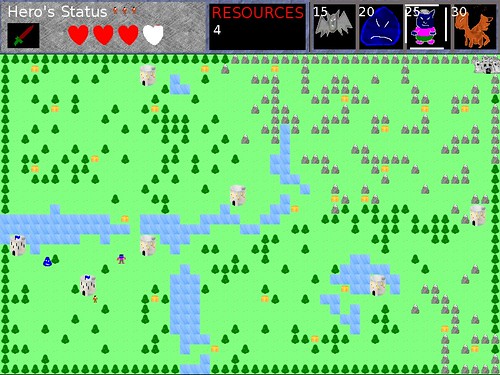
Even before the Ludum Dare October Challenge was announced, I knew I wanted to flesh out and polish Stop That Hero! as a full and complete game.
In 72 hours, the code for Stop That Hero! isn’t terrible, but it is not exactly a good base for me to use. Thinking ahead to the future, if I sell the game, that means I have customers to support. If bugs are found, either during production or after release, I’d rather have code that I can easily work with. So I’ll be rewriting the game mostly from scratch using UnitTest++. In fact, the new project started a few days before October did.
Well, actually, it’s when I started writing code and laying out the project directory structure. I spent a couple of weeks at the end of September looking at the game’s current status, analyzing my design options, and figuring out what directions to go in. With PoV’s challenge, I had a deadline to try to reach, so it helped me determine what the project’s scope should be.
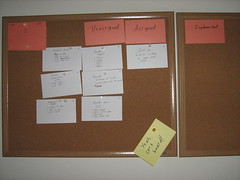
I came up with a list of interrelated concerns I wanted to keep in mind during this project’s run. I posted this list up on my cork board next to my current iteration story cards so I can always see it as a reminder.
- Player interest/boredom
- Interface simplicity/complexity
- Screen size vs world size
- Game balance/dominant strategies
- The Feel of Being a Villain
I might not be able to address everything here in the time I have, but having these concerns written out can help me whenever I wrestle with a design decision.
Player interest/boredom: Some of the feedback I received about the Ludum Dare version of the game was that it wasn’t very fun. One of the concerns I had during development was that the player wouldn’t have much control over the game. In the end, the player’s choices boiled down to which monster to create, when to create it, and which tower to create it from. Once a monster is created, the AI controls the show, and the player can only watch what happens. If the AI was complex, it would make intricate decisions about where to go and what to do, which is fascinating during development, but it probably isn’t too much fun for the player. While I was relatively pleased with how the AI worked out, I didn’t want the game to be more fun to program than to play.
There is a small amount of randomness in the pathfinding to help prevent each play session from looking the same, but I didn’t want the randomness to affect the game too much either. It would be pretty frustrating if you couldn’t predict how useful it would be to summon a monster at a specific tower. So oddly, making the AI simple and more predictable created a much better player experience. He/She could make a decision and feel confident about it or know why it was the wrong move to make. Still, I think there is room for improvement in terms the player’s interaction choices to make it more interesting and compelling. At the very least, there should be better feedback for the player to let him/her know why the AI is doing what it is doing.
In terms of pacing, there are a few issues to address, namely game speed and resource increments.
The game runs very slowly by default. The thinking behind this speed was that I wanted this game to have a more epic feel. The hero would slowly be making his way to your castle, tackling towers along the way, and you’ll be working on armies to deal with him. In other games, when you’re in the role of the hero, you are progressing through the game level by level, screen by screen, enemy by enemy, and I didn’t want the game to be over too quickly.
Unfortunately, I learned that testing AI and other feature changes was annoying at this speed. With 72 hours to make a game, waiting 20 minutes to see what happens when the hero makes it to the castle was way too long. Eventually, I created a debug speed for myself. In the end, I found that I enjoyed playing at this increased speed. Game sessions were quick and easy to replay again and again, reminding me of how easy it is to get sucked into hours of playing Strange Adventures in Infinite Space even though each session might not last more than a few minutes at most.
Pressing “F” speeds Stop That Hero! up 10x, but unfortunately I didn’t provide such documentation in the original release of the game itself so most people probably played the slower-paced (and less fun) version.
Regardless of the game speed, the resource increments came in too slowly and only got worse as a game session went on. As I explained in the Stop That Hero! post-mortem, I was trying to prevent the player from creating overpowered monsters very quickly, and since I had mere hours of playtesting, I ended up with low starting resources and a very slow increment over time. To make matters worse, I tried to tie those regular resource increments to the number of towers you controlled. In practice, it means that you’re strongest at the beginning of the game when you have hardly any resources, and it only gets worse as the hero clears the towers. In the mid and late game, when you need resources the most, you get less. While you can gain resources depending on the strength of the monster that killed the hero, it was almost impossible to do it with a bat, which would give you the most resources, and if you could kill the hero with a dragon, you’re probably doing well enough that the smaller amount of extra resources are enough. I wasn’t happy with how I handled resources, but again, I had limited time to find a better way.
I spent quite a bit of time since the compo trying to come up with alternative ways to handle resources. I’ll write about those alternatives later. In any case, I wish I had thought to make the monsters much weaker than the hero so you could create an army instead of a handful of monsters.
Interface simplicity/complexity: I liked that the player’s input was limited to clicking, but it put a lot more responsibility on me as the game designer to make sure that the player could do meaningful things with those clicks. Since I am also interested in giving the player more interesting choices and options, I need to worry about how complex the interface can get.
Right now, the player is limited to clicking on the UI at the top of the screen and on the towers. If I wanted the player to have a bit more influence on the AI, how would I provide those controls without making things confusing? One thing I’d like to experiment with is the inclusion of a flag or banner. You can click to place it in any valid location on the map, and your minions will try to reach it, giving you a bit more control over the monsters in your army. Maybe you want them to move towards a specific tower to defend it, or maybe you want to head the hero off at some location. Either way, you no longer have to worry if the AI is capable of figuring out where the best place to go is.
So how do I do it? Do I simply provide a banner icon in the UI, and clicking on it changes the mouse cursor so that the next click places the banner? Does clicking on any non-tower result in the placement of the banner by default, eliminating the need for the icon? Can the player choose to influence particular individuals and leave others alone, or is it all or nothing? Is the banner always present, or should it disappear after some time? Maybe it should disappear when the first monster touches it? Maybe monsters will ignore it after they do touch it, allowing existing monsters to continue moving toward it. Should new monsters created when a banner is out go toward the banner, or should they use independent pathfinding until a new banner is placed? Maybe each tower should have its own banner to direct new monsters. As you can see, even this one feature requires a lot more design and can impact a number of different parts of the game.
Basically, even though the player can only click on the screen, I want to make sure the simple interface doesn’t result in simple play. The player’s choice on where, what, and when to click should be powerful enough to allow the player to do everything he/she wants to do. At the same time, I don’t want to clutter up the screen with a million things to click on. I’d rather not make the interface terribly intimidating.
Screen size vs World size:
The game’s graphics are tiny, but the current screen resolution is 800×600. Each tile is 16×16 pixels. It’s playable and works well. For now, I’m focusing on the desktop, but I want to keep in mind the option of porting to mobile? For example, newer versions of the iPhone might support the current resolution, but older models would only support 400×300. Halving the tiles to 8×8 would functionally work, but the hero and monster entities are smaller still! Would they even be recognizable at such a tiny resolution?
Could the graphics be blown up? I could try to make the game using 32×32 tiles, and then the smaller resolution version would use what I have now, and both would be fine. The question then becomes: will the game world be large enough?
I’d rather not let the player have the option of scrolling on the map simply because doing so would complicate the interface more, so I’d like the entire world to fit on the screen. If the world is currently 50×32 tiles, and halving that would be 25×16 tiles.
Since the game currently runs relatively quickly, it’s hard for me to see how good it would be to shorten it. Then again, pacing might work out better. I’d like to experiment with the world size and graphic resolution to see how it all feels.
Game balance/dominant strategies:
I don’t want the player to find a single, unbeatable way to play. It removes the challenge and stops it from being a game. Of course, I also don’t want the game to be too hard. I don’t want the player to feel like he/she should only use one or two of the monsters. The bat flies but is super weak. The blob is slow and land-based, but a little stronger. The ogre is stronger still. The dragon can fly and is fastest and strongest. With the current version of the game, I found that I rarely used blobs or ogres since I either couldn’t afford anything other than bats or I wanted to wait until I had enough resources for the dragons. When I used the blobs or ogres, they moved slowly and stupidly. Of course, that was what I originally wanted them to do, but it only became obvious after release how annoying those two units were. Making them somewhat smarter might have changed the feel of the game, but I may end up with completely different monsters by the time this project is over.
The Feel of Being a Villain:
The game needs to let the player feel like he/she is doing evil. A big part of it will come from the graphics and audio, but what about the game play? Creating monsters should feel good for being so wrong. Killing the hero should result in a mini-celebration. Could towns be razed? Does the land look worse as you do better in the game? Is there a way to convey the player’s evil power whenever he/she does an action in the game? Can the mouse cursor look like an evil, gnarled hand? What would I do for mobile phones with no mouse cursor?
What do you think? I’d love to get feedback on some of these thoughts.



 shortly before the compo started, and I realized that I never did so in all the time it was on my shelf! I learned some really cool and basic techniques, and I learned that sometimes simple AI tech is better than more complex AI tech. I was also glad I had
  to act as a more in-depth, up-to-date resource. Between these two books, I was able to create a decent bit of AI. My game’s AI needs related to behavior and pathfinding. Behavior was easily handled by a state machine, but the biggest dependency was on pathfinding. My implementation of A* was somewhat flawed from the start due to the fact that my AI agents didn’t necessarily have a single target at any given time and it was possible they didn’t see anything near them in the first place, but I was pleased with the results considered how much time I had to work within. Seeing a bunch of AI monsters moving about the screen on their own, avoiding each other, and otherwise looking like they had agendas of their own was a proud moment for me.